Review Comments (0) Screenshots (4) Questions & Answers (0) Votes (1) Awards (10) Wiki  
-Please log in to rate
2 2/5 (1)
-GeoVid
-2.4.0.14
- www.geovid.com
- 113 people
Download VidGIF

11.25 MBDownloaded 301 times


Review

This is a quick review

VidGIF is a tool for converting selected video file to animation GIF formats. By using VidGIF you can create amusing avatars, animated logos for your website. It?s also useful for webmasters who want to place graphic on the website. VidGIF converts video of any format that could be watched on PC. It supports AVI, WMV, MOV, MPEG and other video files. VidGIF allows one having control over width, height and FPS of GIF animation. But note that the smaller size your video has the better quality of animation GIF you will get. VidGIF has very simple and friendly-using interface, that?s why you will not have any difficulties to manage it.
 
The following full-length review applies to version 2.3

VidGif by GeoVid is a nice application that converts video from popular formats such as AVI, WMV, MOV, and MPEG to GIF animation files.

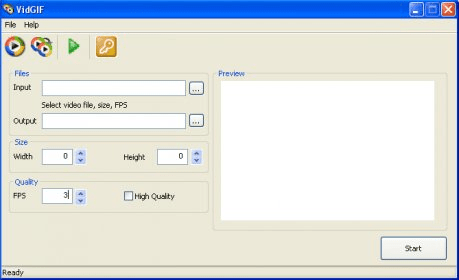
The program allows you to choose the desired quality (with FPS and high-quality check box), size (select width and height of GIF animation), and trim video by setting start and end points to let you convert only a clip or a segment of the input movie.

VidGIF presents a nice and intuitive user interface with a preview screen, and a time line to help you trim video clips. It can only convert one file at a time and the conversion process takes a long time (for a 1minute clip it took approximately 4 minutes with normal quality) but the resulting GIF animation was quite good.

A useful tool for those who enjoy creating their own animations and would like to convert some of their videos to GIF. If you want to test this software, a free trial is available for downloading.
System Requirements:
Windows Vista, Windows XP, Windows 2000, Windows 2003
HDD - 1 Gb and more
RAM - 128 Mb and more
DirectX 9 or better
Advantages
  • Easy to use.
  • Nice Graphic interface.
Disadvantages
  • No batch conversion.

Reviewed by: Daniel Verdesoto

Reviewer rating: Editor's rating 4

Screenshots

Main Window Main Window Main Main Trim Trim Conversion Process Conversion Process

Latest comments


There are no comments, be the first one!
Add new comment
Download siClient

Email Address:

Password:

Register now »

Forgot password?

Copyright © 2009, Informer Technologies, Inc. About| Privacy and terms| Help| Feedback